Cathy Buggs

Updated 5 months ago

Control multiple PCs with one set of peripherals

Mouse without Borders is a utility tool for PC created by indie developer Truong Do, and is part of the Microsoft Garage Project developing new programs. Users will be able to control multiple computers using a single set of keyboard and mouse peripherals.

Mouse without Borders comes from the same Garage Project hub as Seeing AI and the Microsoft Launcher. It was meant to complement the core functionalities and capabilities that Windows already has or Microsoft offers. In its case, it was to make controlling multiple machines from a single input source possible and easy.

How does it work exactly?

Nowadays, it is not uncommon anymore for a person to have and use more than one PC/laptop at a time. It makes for potentially increased productivity since more can be done simultaneously. It does, however, add more peripherals and cables scattered all over your desk. If you're like this and you want an easier—less messy—way to control your machines, Mouse without Border might help you out.

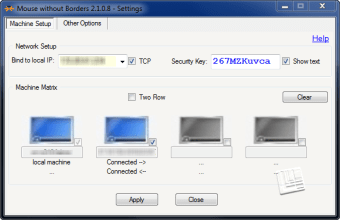
Mouse without Borders lets you control up to 4 PCs using a single keyboard and mouse combo. First, install it on all the machines that you plan to use it on. Decide which one will serve as your primary and take note of its security code and PC name. Open the utility on your other machines, and input the aforementioned details to them to link them up.

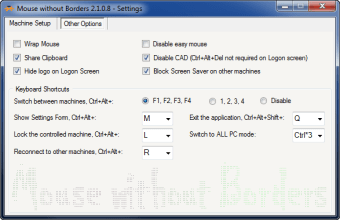
Go into its settings menu and you'll be able to configure other options like sharing clipboards across machines, preventing your mouse from crossing over to other displays, and many more. There is a section dedicated to mapping keyboard shortcuts if you want to. The one thing to keep in mind is that it currently does not work with Windows 11 yet. Hopefully, that will be addressed in a future update.

Control them all

If you work with multiple PCs often, Mouse without Borders is a tool that's worth checking out and will be handy to have around. It lets you control multiple machines using only one pair of keyboard and mouse. It's lightweight, easy to setup, and comes with plenty of customization options. Highly recommended.

Cathy Buggs

    With decades of experience in IT management and later as a writer and tutor, she combines technical knowledge with a passion for clear communication. His work spans editing, teaching, and writing, bringing authority and precision to content on technology and related fields.

    • Pros

      • Fast and lightweight
      • Easy setup
      • Supports up to 4 PCs
      • Plenty of customization options
    • Cons

      • Does not work with Windows 11 yet
     0/4

    App specs

    Program available in other languages


    User reviews about Mouse without Borders

    4.2

    2 reviews

    Add review

    Main reviews for you

    • Anonymous user

      What a great tool! I was regularly using two different keyboards and mice and now am down to one. Can't believe how this just works. BTW, it is working seamlessly with Windows 11 as the main computer alongside a Win 10 PC. Thanks to Truong Do and to all who worked on this. Also, to Matt Wojciakowski for the write up. I really appreciate your hard work that is making my work more enjoyable and productive.

    • Anonymous user

      Excellent interface tool. It is invaluable to my work. 10/10

    More

    You may also like

    Alternatives to Mouse without Borders

    Explore Apps

    Latest articles

    Laws concerning the use of this software vary from country to country. We do not encourage or condone the use of this program if it is in violation of these laws.
    Softonic

    Is Mouse without Borders safe?

    100/100

    Score result: Clean

    This file passed a comprehensive security scan using VirusTotal technology. It is safe to download.

    • Virus free
    • Spyware free
    • Malware free
    • Verified by Security Partners

      VirusTotal logo

    Scan Info

    Last scan
    Tuesday, April 30, 2024
    Scan provider
    VirusTotal · Full report

    File Integrity

    File
    MouseWithoutBordersSetup.msi
    SHA256
    52ee7f6ddcd934ac50c937db06820e7ea6cb1a3908c6431b8b0bcb1e641712cb
    SHA1
    0609fd238849a9bc2aac3ed5ac0af68e8eb4be17

    Softonic security commitment

    Mouse without Borders has been thoroughly scanned by our advanced security systems and verified by industry-leading partners. This file comes from the official developer and has passed all our security checks, showing no signs of viruses, malware, or spyware.